
My daughter and I love listening to the Yoto Daily podcast on her Yoto player. It’s a daily podcast featuring a friendly host, and it’s content is the perfect laid back way to start or end the day.
Having a daily, bite-sized podcast is such a fun part of our routine that I decided to make one myself. It’s called the “Curious World” podcast (she came up with the name!) and you can listen to today’s episode here.
And the really neat part is that the process of making an episode is entirely automated.
Why a daily podcast?
Before digging into the “how”, I want to talk about what I wanted in daily podcast.
I wanted to make each podcast episode a small, self-contained exploration on how something works. Every day, I would pick a kid-friendly topic that’s something to do with science, nature, history, etc. and go into detail about what’s happening behind the scenes.
So far, we’ve learned about things like:
- How bioluminesence works (turns out the glow doesn’t generate heat- neat!)
- How telescopes are like looking backwards in time
- All the life in a drop of pond water
- How magnetic fields around the Earth work because the core is made of molten iron swirling around (so metal 🤘)
I also wanted to include a daily “brain game” that’s interactive and a way to encourage thinking through a problem instead of having the content be 100% explanation-based. The goal is curiosity, not trivia.
And it can’t be boring.
Here’s the problem: I don’t have time to make an engaging podcast every day so I needed to think of a different route. This is where AI comes in!
How an episode gets made
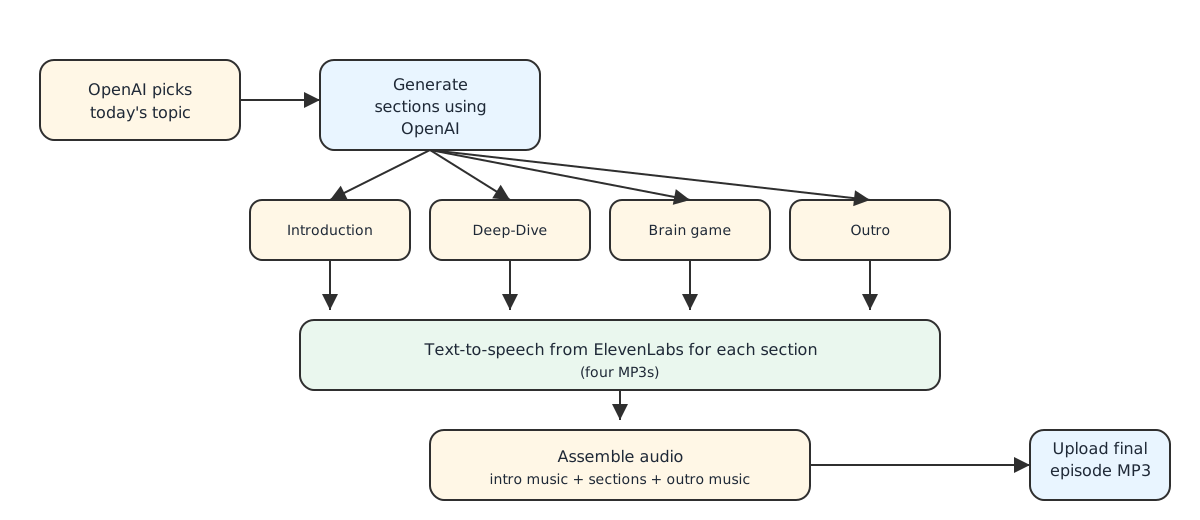
Every day, an automated job kicks off to generate a podcast episode in a series of steps. This job writes the script, turns that into audio, and then stitches the entire thing together with some nice music.
At a high level, the process looks like this:
Writing the script
First, we need a topic! I keep track of all the old topics we’ve covered to avoid repetition. I send those up to OpenAI with a prompt to generate a new kid-friendly topic. This comes back with something like “Magnetic Mysteries: Earth’s Invisible Shield”.
Once I have the topic, I generate each section as separate calls to the OpenAI API, passing the prior few sentences as context to help it seamlessly handle transitions.
Here are the sections:
- Intro - Welcoming the listener to the Curious World podcast with their host Jessica 1. It mentions the current date and topic to be covered.
- Deep-Dive - A semi in-depth coverage of the given topic at a level that’s appropriate for a child. It contains fun facts!
- Game - Every day, a brain game is picked. I currently have a bank of 5 games to pick from, and it’ll always pick the same game on the same weekday for consistency.
- Outro - Hoping the child has a great day, and telling them to tune in next time.
Generating the audio
After I have the transcript, I need to turn that into audio that doesn’t sound like a robot.
For this, I’m leaning on ElevenLab’s “Text-to-Speech” (TTS) API. They have great voice selection that makes the audio sound really nice.
There’s also a couple of small details I added to make the audio more engaging:
Music
I used ElevenLab’s music generation to make intro, game, and outro music. It was fun for my daughter and I to generate a variety of samples and pick the one she liked the most.
Emotion
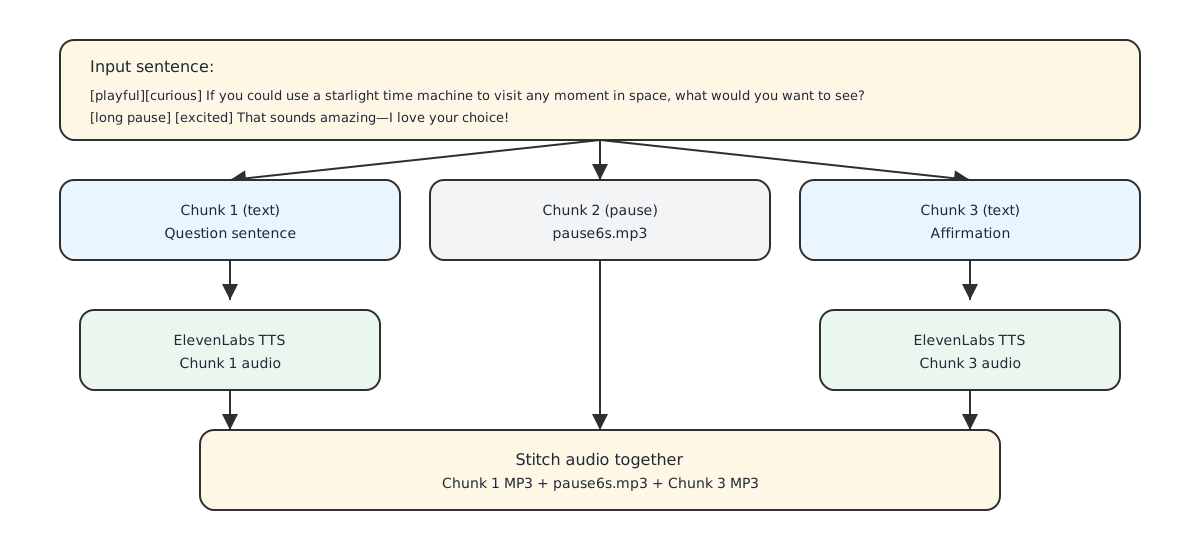
The new “v3 model” model from ElevenLabs supports audio tags. When making the transcript, I tell the OpenAI API to liberally sprinkle audio tags in. So when telling the punchline to a joke it might add [laughing], or when introducing the topic it’ll use [excited].
This makes the overall feel of the audio more natural and expressive.
Pauses
Interaction is such a nice part of podcasts like this. I love when it creates questions and encourages answers from the listener.
To leave space for this, I tell the API to include either [long pause] or [short pause] tags after asking a question.
Then I need to actually make a pause happen. To do this, I do something incredibly complex and technical which is to… add a hardcoded empty MP3 file - either 3 or 6 seconds - where the pause should be. 😅
Publishing the episode
The last step is to store the final MP3 and transcript. I keep all of the old episodes around, but I update the “latest” episode so it’s always available at the same URL.
To make it play on the Yoto player, I used a “Make Your Own” (MYO) card where I wrote the URL to the podcast onto the card. So every day we plug in the card and ✨ magically ✨ the new episode plays.
This works better than I thought
This isn’t perfect, and I’m tweaking things here and there to make it flow more naturally. But it works and my daughter and I both love listening to the podcast every day. The topics are interesting, the deep dives are the perfect level of depth, and we love thinking through the brain games together.
Moving forward, I have some fun ideas about hooking more natively into the new Yoto API to make the podcast more interactive. I’m also considering using ElevenLabs’ sound effects generation and maybe some other tweaks so the podcast episodes get more and more polished.
You can find the code here. One last fun fact is that I wrote ~none of it myself. It was nearly all vibe coded with Codex.
And, of course, you can always listen to today’s podcast here. Enjoy!
1. I originally used the "Jessica" ElevenLabs voice before I switched to a different voice that worked better with the v3 model. I kept the name.